4주차 과제
import pandas as pd
import numpy as np
import matplotlib.pyplot as plt
from sklearn.model_selection import train_test_split
from sklearn.preprocessing import MinMaxScaler
from sklearn.datasets import make_classification
from sklearn.neighbors import KNeighborsClassifier
from sklearn import metrics
1. 가상의 학생 성적 데이터를 활용한 데이터 전처리 과정을 구현해보세요.
- 가상의 학생 성적 데이터가 제공되지 않았으므로 가상의 학생 성적 데이터를 먼저 만들어 주어야한다.
- 가상 학생 성적 데이터를 만들기 위한 조건
- 데이터 전처리 과정에서 결측치를 처리하는 과정을 구현해보기 위해서 결측치 즉,
np.nan이 포함된 데이터를 만들고자 하였다. - 데이터 이상치를 확인하고 제거해보는 것을 구현하기 위해 성적이 0 ~ 100 사이가 아닌 값을 넣고자 하였다. 간단하게 (-1 혹은 101로 처리)
- 2번 문제를 풀이하기 위해 100개의 데이터로 만들어보았다.
- 데이터 전처리 과정에서 결측치를 처리하는 과정을 구현해보기 위해서 결측치 즉,
# 시드 설정
np.random.seed(42)

# 데이터 개수 설정
num_students = 100

# 학생 ID 생성
student_ids = np.arange(1, num_students + 1)

# 학생 나이 설정
ages = np.random.randint(17, 20, size=num_students)

# 학생 성별 설정
genders = np.random.choice(['Male', 'Female'], size=num_students)

# 학생 과목 점수 설정
math = np.random.randint(0, 101, size=num_students)
english = np.random.randint(0, 101, size=num_students)
science = np.random.randint(0, 101, size=num_students)

# DataFrame 생성
df = pd.DataFrame({
    'Student_ID': student_ids,
    'Age': ages,
    'Gender': genders,
    'Math': math,
    'English': english,
    'Science': science
})

# 결측치 추가
for col in ['Age', 'Math', 'English', 'Science']:
  nan_indices = np.random.choice(df.index, size=int(num_students * 0.1), replace=False)
  df.loc[nan_indices, col] = np.nan

# 이상치 추가
for col in ['Math', 'English', 'Science']:
  outlier_indices = np.random.choice(df.index, size=int(num_students * 0.1), replace=False)
  df.loc[outlier_indices, col] = np.random.choice([-1, 101])

df
| Student_ID | Age | Gender | Math | English | Science | |
|---|---|---|---|---|---|---|
| 0 | 1 | 19.0 | Female | 91.0 | 15.0 | 32.0 |
| 1 | 2 | 17.0 | Female | 88.0 | 89.0 | 66.0 |
| 2 | 3 | 19.0 | Female | 61.0 | 59.0 | 101.0 |
| 3 | 4 | 19.0 | Male | 96.0 | NaN | 24.0 |
| 4 | 5 | 17.0 | Male | 0.0 | 0.0 | 94.0 |
| ... | ... | ... | ... | ... | ... | ... |
| 95 | 96 | 17.0 | Female | 101.0 | 96.0 | 89.0 |
| 96 | 97 | 17.0 | Male | 101.0 | 62.0 | 61.0 |
| 97 | 98 | 19.0 | Female | 41.0 | 84.0 | 101.0 |
| 98 | 99 | 17.0 | Female | 98.0 | 31.0 | 8.0 |
| 99 | 100 | 17.0 | Male | NaN | NaN | 11.0 |
100 rows × 6 columns
# 결측치 확인

nan_df = df[df.isna().any(axis=1)]
nan_df
| Student_ID | Age | Gender | Math | English | Science | |
|---|---|---|---|---|---|---|
| 3 | 4 | 19.0 | Male | 96.0 | NaN | 24.0 |
| 5 | 6 | NaN | Male | 26.0 | 47.0 | 53.0 |
| 6 | 7 | 19.0 | Male | 61.0 | 11.0 | NaN |
| 8 | 9 | 19.0 | Male | 2.0 | 36.0 | NaN |
| 14 | 15 | NaN | Male | 36.0 | 79.0 | 65.0 |
| 20 | 21 | NaN | Female | NaN | 23.0 | 101.0 |
| 24 | 25 | 17.0 | Female | 51.0 | 37.0 | NaN |
| 32 | 33 | 18.0 | Female | NaN | 81.0 | 59.0 |
| 41 | 42 | 19.0 | Male | 100.0 | NaN | 13.0 |
| 42 | 43 | 19.0 | Male | 95.0 | 32.0 | NaN |
| 49 | 50 | NaN | Male | NaN | 66.0 | 86.0 |
| 50 | 51 | 18.0 | Male | 31.0 | NaN | 62.0 |
| 51 | 52 | 17.0 | Male | 69.0 | NaN | 85.0 |
| 53 | 54 | 17.0 | Female | NaN | 75.0 | 24.0 |
| 54 | 55 | NaN | Female | 54.0 | 58.0 | 57.0 |
| 63 | 64 | 18.0 | Male | NaN | 26.0 | 41.0 |
| 65 | 66 | 18.0 | Female | 15.0 | NaN | 14.0 |
| 67 | 68 | NaN | Male | 72.0 | 96.0 | 59.0 |
| 71 | 72 | NaN | Male | 101.0 | 68.0 | 52.0 |
| 73 | 74 | 18.0 | Male | NaN | 47.0 | 4.0 |
| 74 | 75 | 18.0 | Female | 58.0 | 18.0 | NaN |
| 75 | 76 | 18.0 | Male | 101.0 | NaN | 5.0 |
| 77 | 78 | 19.0 | Male | 89.0 | NaN | 93.0 |
| 78 | 79 | 19.0 | Male | 66.0 | -1.0 | NaN |
| 81 | 82 | NaN | Female | 95.0 | NaN | 39.0 |
| 82 | 83 | 18.0 | Female | NaN | 29.0 | 51.0 |
| 83 | 84 | NaN | Female | 51.0 | 92.0 | 101.0 |
| 86 | 87 | NaN | Male | 101.0 | 98.0 | 18.0 |
| 87 | 88 | 17.0 | Male | NaN | 36.0 | NaN |
| 91 | 92 | 17.0 | Female | 56.0 | NaN | 57.0 |
| 99 | 100 | 17.0 | Male | NaN | NaN | 11.0 |
# 이상치 확인

outlier_df = df[(df['Math'] < 0) | (df['English'] < 0) | (df['Science'] < 0) | (df['Math'] > 100) | (df['English'] > 100) | (df['Science'] > 100)]
outlier_df
| Student_ID | Age | Gender | Math | English | Science | |
|---|---|---|---|---|---|---|
| 2 | 3 | 19.0 | Female | 61.0 | 59.0 | 101.0 |
| 15 | 16 | 17.0 | Female | 96.0 | -1.0 | 101.0 |
| 20 | 21 | NaN | Female | NaN | 23.0 | 101.0 |
| 26 | 27 | 17.0 | Male | 101.0 | 98.0 | 25.0 |
| 27 | 28 | 19.0 | Female | 51.0 | -1.0 | 98.0 |
| 29 | 30 | 19.0 | Male | 38.0 | 24.0 | 101.0 |
| 31 | 32 | 19.0 | Female | 2.0 | 17.0 | 101.0 |
| 36 | 37 | 19.0 | Male | 1.0 | 79.0 | 101.0 |
| 38 | 39 | 17.0 | Male | 91.0 | -1.0 | 64.0 |
| 40 | 41 | 17.0 | Female | 86.0 | -1.0 | 101.0 |
| 47 | 48 | 17.0 | Female | 52.0 | 7.0 | 101.0 |
| 55 | 56 | 19.0 | Female | 74.0 | -1.0 | 62.0 |
| 57 | 58 | 17.0 | Male | 101.0 | 29.0 | 21.0 |
| 59 | 60 | 19.0 | Female | 101.0 | 50.0 | 57.0 |
| 60 | 61 | 18.0 | Male | 68.0 | -1.0 | 85.0 |
| 61 | 62 | 17.0 | Male | 101.0 | 7.0 | 48.0 |
| 71 | 72 | NaN | Male | 101.0 | 68.0 | 52.0 |
| 75 | 76 | 18.0 | Male | 101.0 | NaN | 5.0 |
| 78 | 79 | 19.0 | Male | 66.0 | -1.0 | NaN |
| 79 | 80 | 18.0 | Male | 18.0 | -1.0 | 98.0 |
| 83 | 84 | NaN | Female | 51.0 | 92.0 | 101.0 |
| 86 | 87 | NaN | Male | 101.0 | 98.0 | 18.0 |
| 89 | 90 | 17.0 | Female | 101.0 | -1.0 | 18.0 |
| 92 | 93 | 17.0 | Female | 88.0 | -1.0 | 54.0 |
| 95 | 96 | 17.0 | Female | 101.0 | 96.0 | 89.0 |
| 96 | 97 | 17.0 | Male | 101.0 | 62.0 | 61.0 |
| 97 | 98 | 19.0 | Female | 41.0 | 84.0 | 101.0 |
- 이상치 처리 : 이상치가 결측치 보간에 영향을 줄 수 있으므로 이상치 먼저 처리한다.</br> 이상치에서
-1은np.nan이라고 판단하고np.nan으로 바꿔넣고101은 완전 이상치라 판단하고 제거해보았다.
df = df[(df['Math'] <= 100) & (df['Age'] <= 100) & (df['Science'] <= 100)]
df.replace(-1, np.nan, inplace=True)
df
<ipython-input-51-c5d88ba489df>:2: SettingWithCopyWarning:
A value is trying to be set on a copy of a slice from a DataFrame

See the caveats in the documentation: https://pandas.pydata.org/pandas-docs/stable/user_guide/indexing.html#returning-a-view-versus-a-copy
  df.replace(-1, np.nan, inplace=True)
| Student_ID | Age | Gender | Math | English | Science | |
|---|---|---|---|---|---|---|
| 0 | 1 | 19.0 | Female | 91.0 | 15.0 | 32.0 |
| 1 | 2 | 17.0 | Female | 88.0 | 89.0 | 66.0 |
| 3 | 4 | 19.0 | Male | 96.0 | NaN | 24.0 |
| 4 | 5 | 17.0 | Male | 0.0 | 0.0 | 94.0 |
| 7 | 8 | 18.0 | Female | 76.0 | 68.0 | 66.0 |
| ... | ... | ... | ... | ... | ... | ... |
| 91 | 92 | 17.0 | Female | 56.0 | NaN | 57.0 |
| 92 | 93 | 17.0 | Female | 88.0 | NaN | 54.0 |
| 93 | 94 | 19.0 | Female | 49.0 | 98.0 | 89.0 |
| 94 | 95 | 17.0 | Female | 22.0 | 59.0 | 100.0 |
| 98 | 99 | 17.0 | Female | 98.0 | 31.0 | 8.0 |
61 rows × 6 columns
- 결측값 처리 : 데이터 확인 결과 의도치 않게
Age가 결측치인 것들은 점수 들 중 하나가101이상치로 나와 다 제거 되었다. 하지만Age의 값이np.nan일 경우 중앙값으로 대체하는 코드를 첨부한다.
df.loc[:, 'Age'] = df['Age'].fillna(df['Age'].median())
df.loc[:, 'Math'] = df['Math'].fillna(df['Math'].mean())
df.loc[:, 'English'] = df['English'].fillna(df['English'].mean())
df.loc[:, 'Science'] = df['Science'].fillna(df['Science'].mean())

df
| Student_ID | Age | Gender | Math | English | Science | |
|---|---|---|---|---|---|---|
| 0 | 1 | 19.0 | Female | 91.0 | 15.0 | 32.0 |
| 1 | 2 | 17.0 | Female | 88.0 | 89.0 | 66.0 |
| 3 | 4 | 19.0 | Male | 96.0 | 47.0 | 24.0 |
| 4 | 5 | 17.0 | Male | 0.0 | 0.0 | 94.0 |
| 7 | 8 | 18.0 | Female | 76.0 | 68.0 | 66.0 |
| ... | ... | ... | ... | ... | ... | ... |
| 91 | 92 | 17.0 | Female | 56.0 | 47.0 | 57.0 |
| 92 | 93 | 17.0 | Female | 88.0 | 47.0 | 54.0 |
| 93 | 94 | 19.0 | Female | 49.0 | 98.0 | 89.0 |
| 94 | 95 | 17.0 | Female | 22.0 | 59.0 | 100.0 |
| 98 | 99 | 17.0 | Female | 98.0 | 31.0 | 8.0 |
61 rows × 6 columns
- 데이터 정규화 : MinMaxScale을 이용해 정규화하였다.
scaler = MinMaxScaler()

df[['Age', 'Math', 'English', 'Science']] = scaler.fit_transform(df[['Age', 'Math', 'English', 'Science']])
df
<ipython-input-53-1f2fd14bdd15>:3: SettingWithCopyWarning:
A value is trying to be set on a copy of a slice from a DataFrame.
Try using .loc[row_indexer,col_indexer] = value instead

See the caveats in the documentation: https://pandas.pydata.org/pandas-docs/stable/user_guide/indexing.html#returning-a-view-versus-a-copy
  df[['Age', 'Math', 'English', 'Science']] = scaler.fit_transform(df[['Age', 'Math', 'English', 'Science']])
| Student_ID | Age | Gender | Math | English | Science | |
|---|---|---|---|---|---|---|
| 0 | 1 | 1.0 | Female | 0.91 | 0.151515 | 0.313131 |
| 1 | 2 | 0.0 | Female | 0.88 | 0.898990 | 0.656566 |
| 3 | 4 | 1.0 | Male | 0.96 | 0.474747 | 0.232323 |
| 4 | 5 | 0.0 | Male | 0.00 | 0.000000 | 0.939394 |
| 7 | 8 | 0.5 | Female | 0.76 | 0.686869 | 0.656566 |
| ... | ... | ... | ... | ... | ... | ... |
| 91 | 92 | 0.0 | Female | 0.56 | 0.474747 | 0.565657 |
| 92 | 93 | 0.0 | Female | 0.88 | 0.474747 | 0.535354 |
| 93 | 94 | 1.0 | Female | 0.49 | 0.989899 | 0.888889 |
| 94 | 95 | 0.0 | Female | 0.22 | 0.595960 | 1.000000 |
| 98 | 99 | 0.0 | Female | 0.98 | 0.313131 | 0.070707 |
61 rows × 6 columns
- 데이터 변환 : Student_ID에 가중치를 부여하지 않기 위해 One-Hot 인코딩 이후 탐색을 위해 Index 초기화
df = pd.get_dummies(df, columns=['Student_ID'])
df.reset_index(drop=True, inplace=True)
df
| Age | Gender | Math | English | Science | Student_ID_1 | Student_ID_2 | Student_ID_4 | Student_ID_5 | Student_ID_8 | ... | Student_ID_81 | Student_ID_85 | Student_ID_86 | Student_ID_89 | Student_ID_91 | Student_ID_92 | Student_ID_93 | Student_ID_94 | Student_ID_95 | Student_ID_99 | |
|---|---|---|---|---|---|---|---|---|---|---|---|---|---|---|---|---|---|---|---|---|---|
| 0 | 1.0 | Female | 0.91 | 0.151515 | 0.313131 | True | False | False | False | False | ... | False | False | False | False | False | False | False | False | False | False |
| 1 | 0.0 | Female | 0.88 | 0.898990 | 0.656566 | False | True | False | False | False | ... | False | False | False | False | False | False | False | False | False | False |
| 2 | 1.0 | Male | 0.96 | 0.474747 | 0.232323 | False | False | True | False | False | ... | False | False | False | False | False | False | False | False | False | False |
| 3 | 0.0 | Male | 0.00 | 0.000000 | 0.939394 | False | False | False | True | False | ... | False | False | False | False | False | False | False | False | False | False |
| 4 | 0.5 | Female | 0.76 | 0.686869 | 0.656566 | False | False | False | False | True | ... | False | False | False | False | False | False | False | False | False | False |
| ... | ... | ... | ... | ... | ... | ... | ... | ... | ... | ... | ... | ... | ... | ... | ... | ... | ... | ... | ... | ... | ... |
| 56 | 0.0 | Female | 0.56 | 0.474747 | 0.565657 | False | False | False | False | False | ... | False | False | False | False | False | True | False | False | False | False |
| 57 | 0.0 | Female | 0.88 | 0.474747 | 0.535354 | False | False | False | False | False | ... | False | False | False | False | False | False | True | False | False | False |
| 58 | 1.0 | Female | 0.49 | 0.989899 | 0.888889 | False | False | False | False | False | ... | False | False | False | False | False | False | False | True | False | False |
| 59 | 0.0 | Female | 0.22 | 0.595960 | 1.000000 | False | False | False | False | False | ... | False | False | False | False | False | False | False | False | True | False |
| 60 | 0.0 | Female | 0.98 | 0.313131 | 0.070707 | False | False | False | False | False | ... | False | False | False | False | False | False | False | False | False | True |
61 rows × 66 columns
2. 가상 데이터셋을 생성한 뒤 데이터셋을 학습, 검증, 테스트 데이터셋으로 분할해보세요.
- 위의 데이터를 train, test, validation으로 6:2:2로 나누었다. 데이터셋은 생략하고 개수만 출력하였다.
train, test = train_test_split(df, test_size=0.2, random_state=42)
train, val = train_test_split(train, test_size=0.2, random_state=42)

print(f"train 데이터셋 개수 : {len(train)}")
print(f"test 데이터셋 개수 : {len(test)}")
print(f"validation 데이터셋 개수 : {len(val)}")
train 데이터셋 개수 : 38
test 데이터셋 개수 : 13
validation 데이터셋 개수 : 10
#3. 간단한 이진 분류 문제를 k-최근접이웃 알고리즘을 사용해 해결해보세요.
- 이진 분류에 대한 데이터셋이 제공 되지 않아 먼저 이진 분류 데이터셋
sklearn의make_classification()메서드를 이용해 만들었다.
X, y = make_classification(n_samples=200, n_features=2, n_redundant=0,
                           n_informative=2, n_clusters_per_class=1, random_state=42)
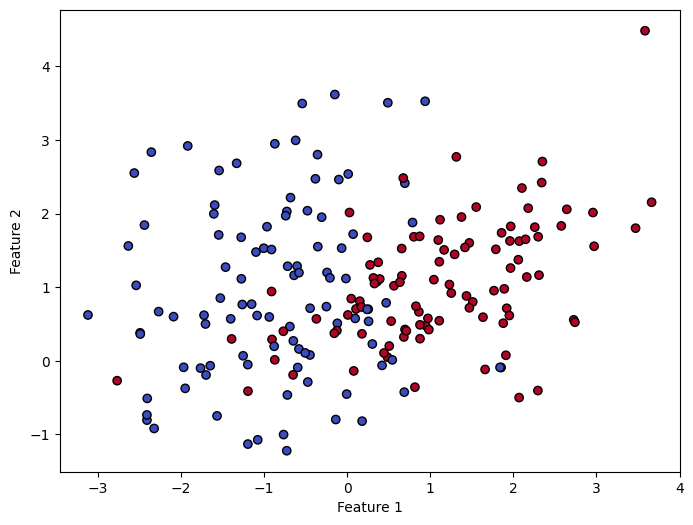
- 만들어진 데이터셋을 시각화하여 어떤 형식인지 확인
plt.figure(figsize=(8, 6))
plt.scatter(X[:, 0], X[:, 1], c=y, cmap='coolwarm', edgecolors='k')
plt.xlabel('Feature 1')
plt.ylabel('Feature 2')
plt.show()
- 학습을 위해 train 데이터와 test 데이터를 분할 (8:2)
X_train, X_test, y_train, y_test = train_test_split(X, y, test_size=0.2, random_state=42)

print(f"train 데이터셋 개수 : {len(X_train)}, {len(y_train)}")
print(f"test 데이터셋 개수 : {len(X_test)}, {len(y_test)}")
train 데이터셋 개수 : 160, 160
test 데이터셋 개수 : 40, 40
- KNN 모델 생성 및 학습
KNN = KNeighborsClassifier(n_neighbors=3)
KNN.fit(X_train, y_train)
KNeighborsClassifier(n_neighbors=3)In a Jupyter environment, please rerun this cell to show the HTML representation or trust the notebook.
On GitHub, the HTML representation is unable to render, please try loading this page with nbviewer.org.
KNeighborsClassifier(n_neighbors=3)
- 예측 수행 및 성능 평가
y_pred = KNN.predict(X_test)
confusion_matrix = metrics.confusion_matrix(y_test, y_pred)
accuracy = metrics.accuracy_score(y_test, y_pred)
precision = metrics.precision_score(y_test, y_pred)
recall = metrics.recall_score(y_test, y_pred)
f1 = metrics.f1_score(y_test, y_pred)

print(f"Confusion Matrix : \n{confusion_matrix}")
print(f"Accuracy : {accuracy}")
print(f"Precision : {precision}")
print(f"Recall : {recall}")
print(f"F1 Score : {f1}")
Confusion Matrix :
[[22  1]
 [ 2 15]]
Accuracy : 0.925
Precision : 0.9375
Recall : 0.8823529411764706
F1 Score : 0.9090909090909091
#4. OR, NOT 연산을 모델링해보세요.
- OR 모델링 (FastAPI 수업 내용 참고)
class Model_OR:

  def __init__(self):
    self.weights = np.random.rand(2)
    self.bias = np.random.rand(1)

  def step_function(self, x):
    return 1 if x >= 0 else 0

  def predict(self, x):
    z = np.dot(x, self.weights) + self.bias
    return self.step_function(z)

  def train(self):
    learning_rate = 0.1
    epochs = 20
    inputs = np.array([[0, 0], [0, 1], [1, 0], [1, 1]])
    outputs = np.array([0, 1, 1, 1])

    for epoch in range(epochs):
      for i in range(len(inputs)):
        total_input = np.dot(inputs[i], self.weights) + self.bias
        prediction = self.step_function(total_input)
        error = outputs[i] - prediction
        self.weights += learning_rate * error * inputs[i]
        self.bias += learning_rate * error
- NOT 모델링</br> NOT 모델링은 1차원이므로 가중치와 가중치 업데이트를 스칼라로 변환
class Model_NOT:

  def __init__(self):
    self.weights = np.random.rand(1)
    self.bias = np.random.rand(1)

  def step_function(self, x):
    return 1 if x >= 0 else 0

  def predict(self, x):
    z = x * self.weights + self.bias
    return self.step_function(z)

  def train(self):
    learning_rate = 0.1
    epochs = 20
    inputs = np.array([0, 1])
    outputs = np.array([1, 0])

    for epoch in range(epochs):
      for i in range(len(inputs)):
        total_input = inputs[i] * self.weights + self.bias
        prediction = self.step_function(total_input)
        error = outputs[i] - prediction
        self.weights += learning_rate * error * inputs[i]
        self.bias += learning_rate * error
- OR 모델 점검
orModel = Model_OR()
n = np.array([[0, 0], [0, 1], [1, 0], [1, 1]])

temp = []

for x in n:
  row = {
      '입력 1' : x[0],
      '입력 2' : x[1],
      '출력' : orModel.predict(x)
  }
  temp.append(row)

df = pd.DataFrame(temp)
print("OR 모델 학습 전:")
df
OR 모델 학습 후:
| 입력 1 | 입력 2 | 출력 | |
|---|---|---|---|
| 0 | 0 | 0 | 1 |
| 1 | 0 | 1 | 1 |
| 2 | 1 | 0 | 1 |
| 3 | 1 | 1 | 1 |
orModel.train()
temp = []

for x in n:
  row = {
      '입력 1' : x[0],
      '입력 2' : x[1],
      '출력' : orModel.predict(x)
  }
  temp.append(row)

df = pd.DataFrame(temp)
print("OR 모델 학습 후:")
df
OR 모델 학습 후:
| 입력 1 | 입력 2 | 출력 | |
|---|---|---|---|
| 0 | 0 | 0 | 0 |
| 1 | 0 | 1 | 1 |
| 2 | 1 | 0 | 1 |
| 3 | 1 | 1 | 1 |
- NOT 모델 점검
notModel = Model_NOT()

temp = []
for x in [0, 1]:
  row = {
      '입력' : x,
      '출력' : notModel.predict(x)
  }
  temp.append(row)

df = pd.DataFrame(temp)
print("NOT 모델 학습 전:")
df
NOT 모델 학습 전:
| 입력 | 출력 | |
|---|---|---|
| 0 | 0 | 1 |
| 1 | 1 | 1 |
notModel.train()
temp = []

for x in [0, 1]:
  row = {
      '입력' : x,
      '출력' : notModel.predict(x)
  }
  temp.append(row)

df = pd.DataFrame(temp)
print("NOT 모델 학습 후:")
df
NOT 모델 학습 후:
| 입력 | 출력 | |
|---|---|---|
| 0 | 0 | 1 |
| 1 | 1 | 0 |